
In this case study
Support the conversation without adding another task.
An agent needs to understand the customer’s request, find relevant information, and turn that information into a useful reply. The design challenge is to keep assistance close to the conversation while making it clear what the agent can review and change.
Nextiva’s public Agent Assist page describes in-context guidance, knowledge retrieval, and automated summaries. That establishes product context; the selected Figma screens below show the interaction design examined in this case study. View Nextiva’s Agent Assist overview ↗
For the agent
A live conversation leaves little room to search elsewhere, evaluate an answer, and rewrite it for the customer.
For the service team
Assistance needs a clear review boundary so a suggested response is not confused with an action already taken.
The design challenge
How might we make useful guidance available inside the conversation while keeping the agent in control of the response?
Prioritize the decisions an agent needs to make.
The Figma file provides concrete interface evidence. These observations inform the design rationale; they are not interview findings or measured usability results.
| Observed in the designs | Design priority |
|---|---|
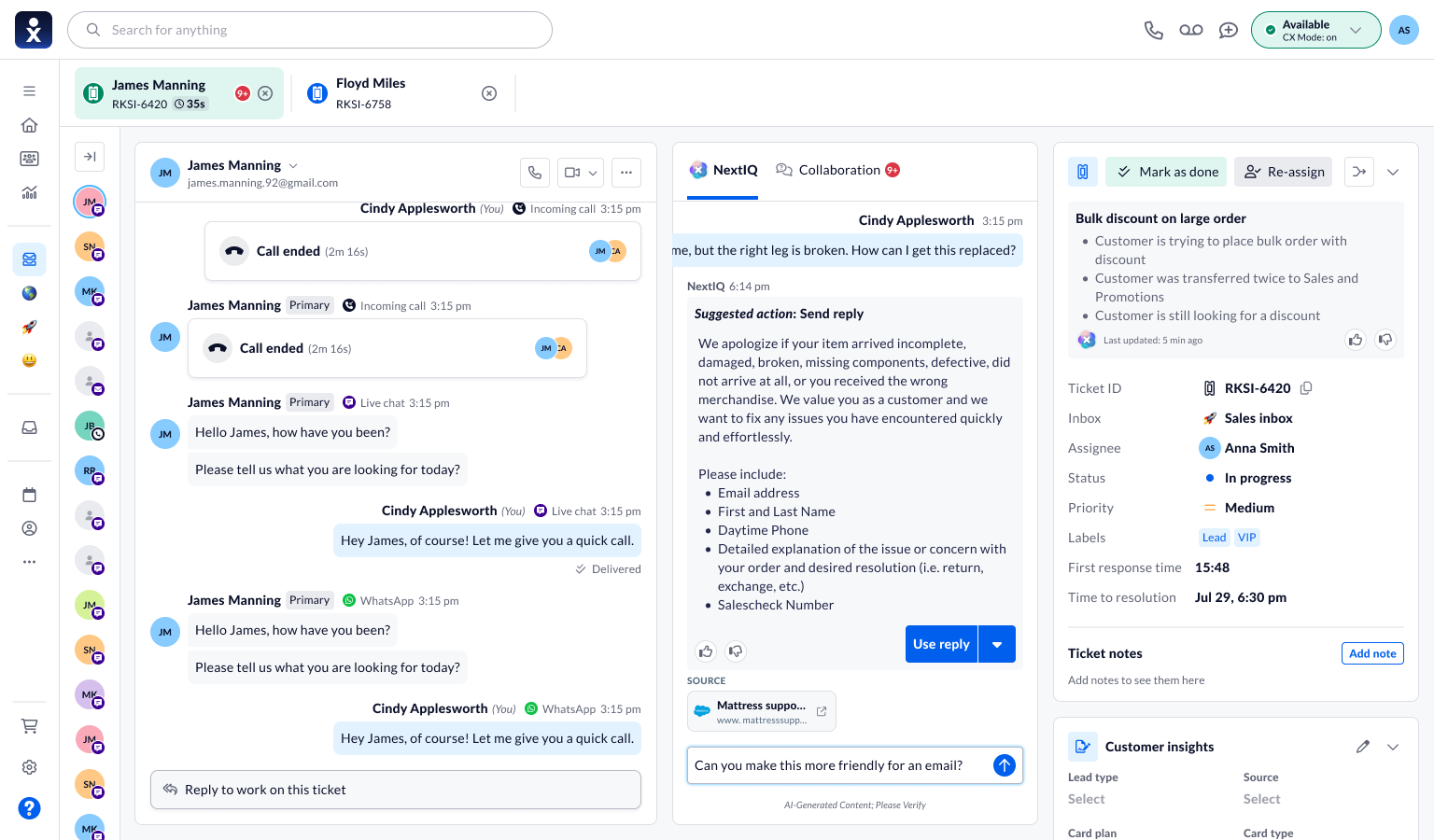
| Customer conversation, NextIQ, and ticket details share one workspace. | Keep assistance close to the context it supports. |
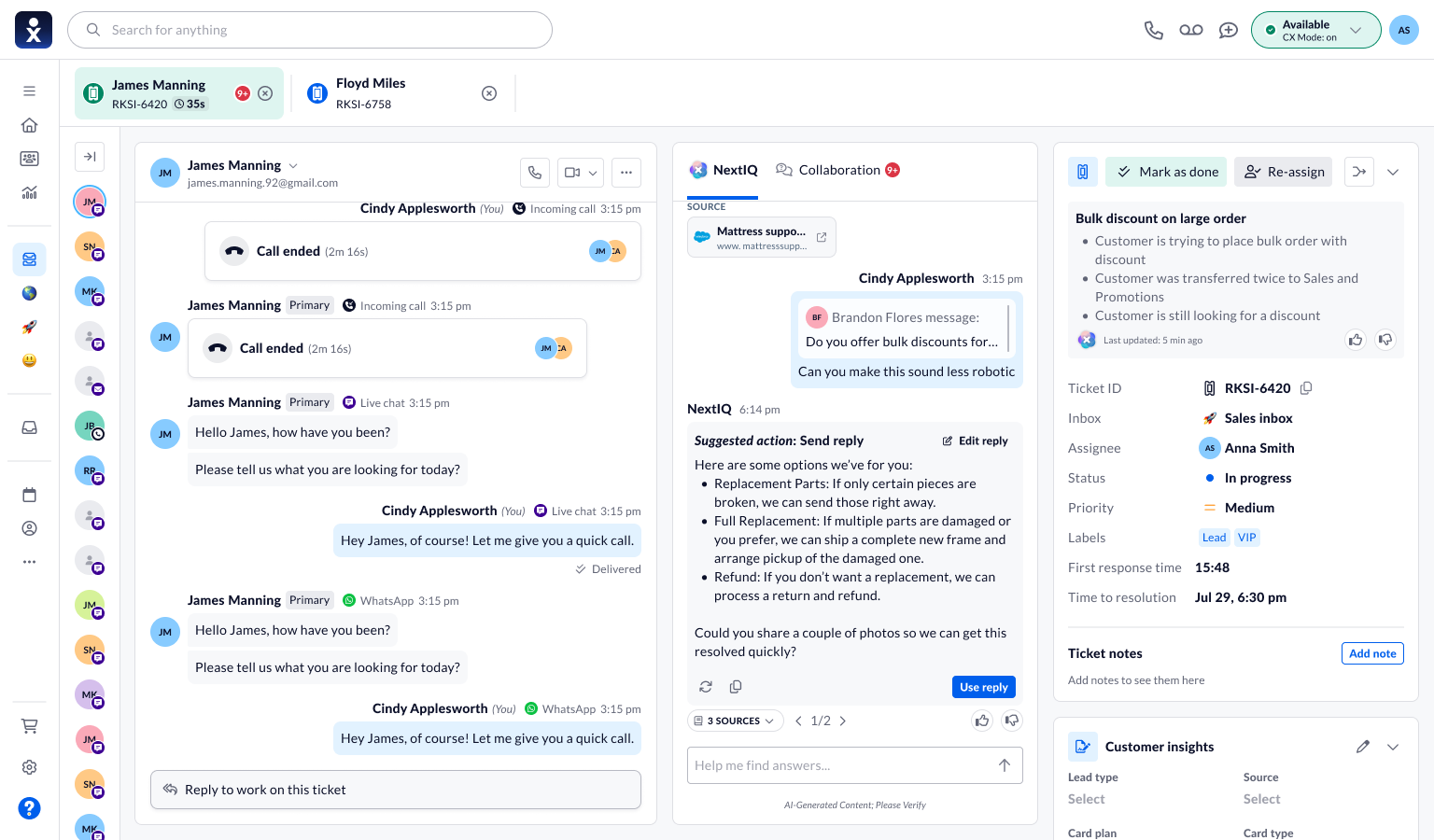
| Suggested replies include Edit reply, Use reply, and source references. | Give agents a review step before applying a suggestion. |
| Formatting menus cover tone, length, language, and channel. | Let agents adapt an answer to the interaction. |
| Autopilot designs sit under mockups for product review. | Distinguish proposed automation from established functionality. |
Make assistance inspectable and editable.
Three decisions connect contextual assistance with an agent’s ability to inspect, adapt, and choose a response.
Keep the conversation in view.
The central NextIQ panel sits between the conversation and ticket context. An agent can ask a follow-up question or review a suggested reply without replacing the customer conversation.
- Design rationale
- Place assistance where the agent already has customer context, reducing the need to reconstruct the question in another workspace.
- Tradeoff
- An inline panel uses screen space. The conversation and ticket details still need to remain readable.
Show where an answer comes from.
Source chips distinguish knowledge-base content, PDFs, text files, and websites. A compact label and open-link affordance offer a route to the underlying material. Default, hover, and click states are documented in the component reference.
Review and refine a suggested action
Editing, source references, response navigation, and feedback remain close to the suggested reply.
- Design rationale
- Make the supporting material available at the moment an agent is deciding whether to use a suggestion.
- Tradeoff
- A source label provides a route to evidence, but the agent still needs to assess whether it supports the answer.
Refine the response, not just accept it.
The formatting design includes shorter or longer replies, bullet points, formal or friendly tone, language selection, and channel-specific drafts. A flow annotation also describes highlighting part of a reply to change only that section. This preserves useful content while giving the agent control over the adjustment.
- Design rationale
- Let agents adapt tone, length, and channel without discarding the useful parts of a draft.
- Tradeoff
- More refinement options add choice. Their scope must be clear, especially when editing only part of a reply.
From a suggestion to a deliberate action.
- 01Read the context
- 02Ask for help
- 03Review & refine
- 04Choose a response
The selected workspace illustrates a practical sequence: inspect the customer’s message, ask NextIQ for help, review the suggested response and its sources, then edit or use the reply. The design also shows response navigation and feedback controls.
Keep follow-up requests connected.
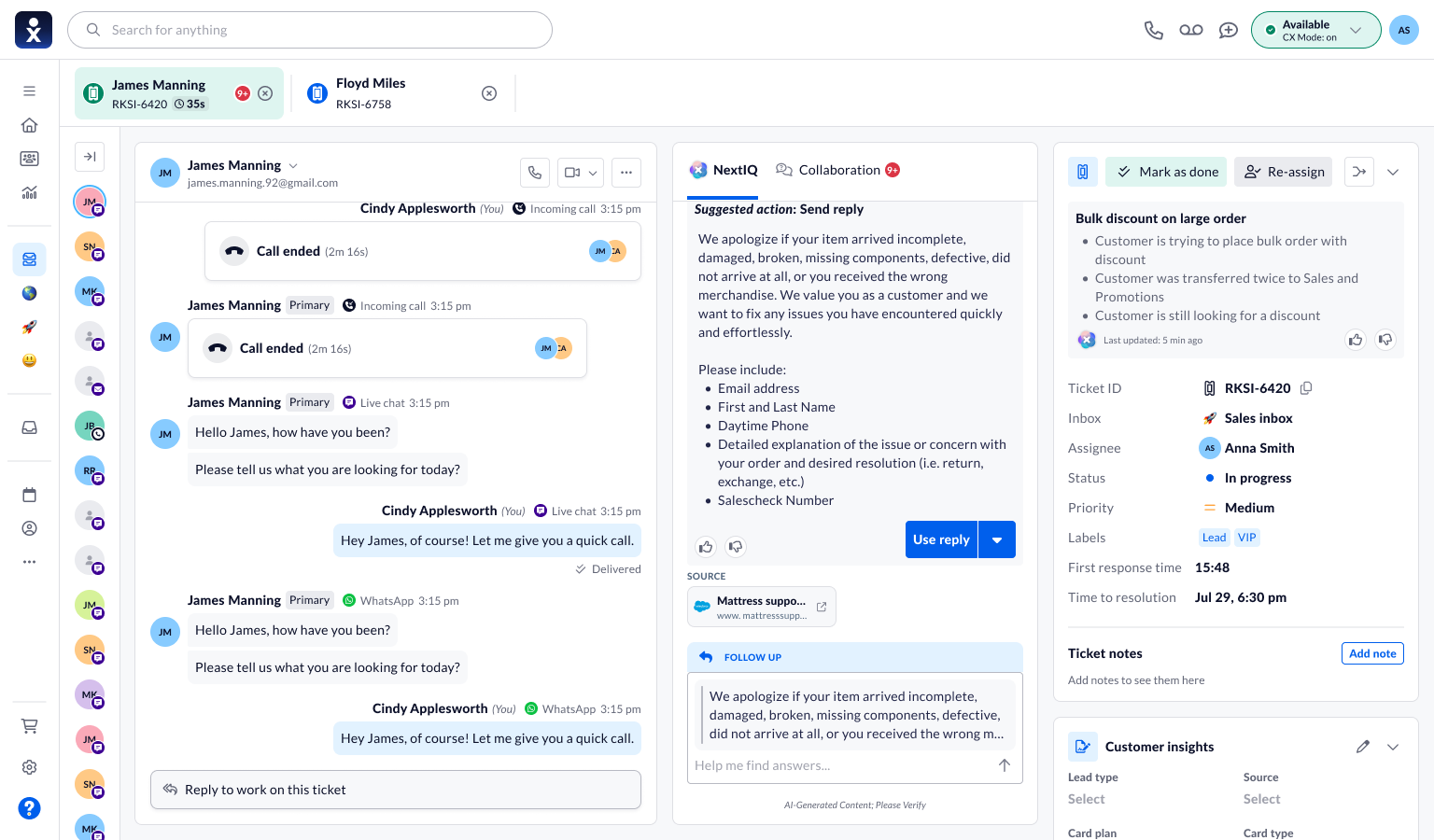
The follow-up composer retains an excerpt of the selected response. This gives the agent a clear reference for the next instruction while the customer conversation stays visible.
Follow up without losing context
The follow-up composer quotes the response so the next request can build on it.
Explore automation with a visible state.
A separate Autopilot mockup shows an enabled toggle, a disabled composer labelled “Autopilot is on,” and a “Reply sent” result in the panel. These cues distinguish an action already taken from advice waiting for review.
As assistance moves from drafting to acting, agents need clearer visibility into what happened and how to intervene. The concept makes the active mode visible; interruption and recovery remain important evaluation points.
Evaluate understanding, not only speed.
The file includes pages labelled for benchmarking and user testing, but those labels alone do not establish study findings. No success rates, time savings, or before-and-after results are claimed here.
A focused evaluation should check whether agents can locate a source, refine only the intended text, distinguish Use reply from a sent response, and understand the active automation mode. Incorrect advice and changing customer context should be included in those scenarios.
What the next validation round should establish
Proposed tasks and success signals for a future evaluation; these are not completed test results.
| Scenario to evaluate | Success signal |
|---|---|
| An agent receives a plausible but incorrect suggestion. | They can inspect the source, identify the mismatch, and edit or reject the draft. |
| An agent changes only one part of a response. | The requested edit affects the intended passage while the rest of the reply remains usable. |
| An agent moves between assistance and the Autopilot concept. | They can distinguish a draft from a sent response and identify the active mode. |
A more conversational, reviewable assistant.
- ContextAssistance beside the conversation
- SourcesReferences agents can inspect
- ControlReply refinement and visible modes
The selected designs connect the agent’s question to a response they can inspect and adapt. The Autopilot work extends that direction into a review-stage concept, where action status becomes especially important.
The key lesson is that useful assistance needs more than a plausible answer. It needs understandable sources, targeted editing, and a clear distinction between suggestions and actions. Measured impact and release status would require separate evidence.
What I take forward
Make control visible at the point of use.
Sources and editing controls are most useful when they sit beside the suggestion being evaluated.
Evaluate the transition from advice to action.
The next step is to test how agents recognize a wrong suggestion and understand automation state under live-conversation pressure.