
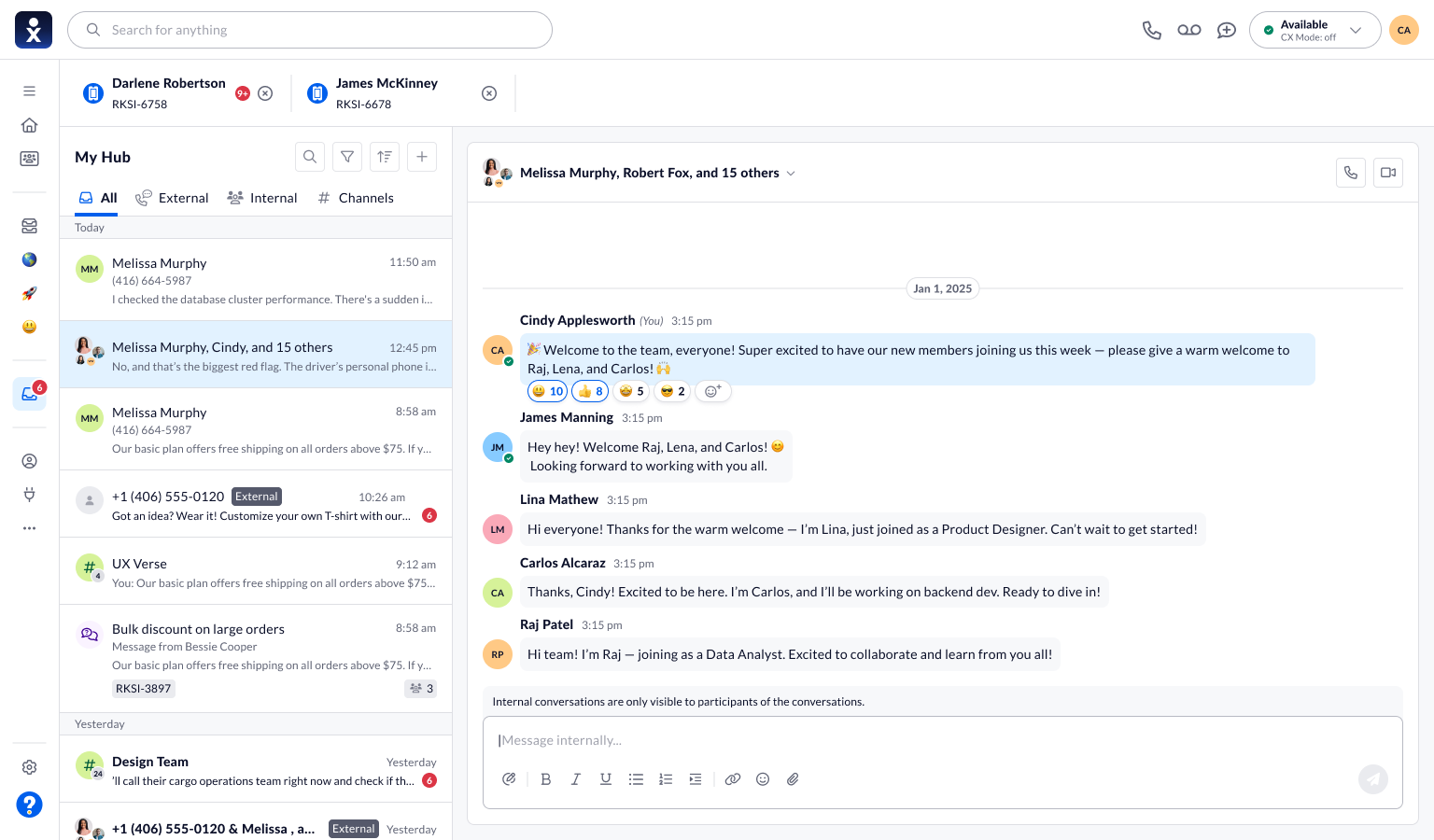
In this case study
The challenge is staying oriented as conversations grow.
People move between customer communication, direct messages, and group discussions. Each conversation has a different audience and history. Important details can become harder to find as messages accumulate.
The design challenge is to keep the active conversation clear while making it easy to recover a key message, involve another person, or organize an ongoing discussion.
For the person replying
Internal discussions and customer conversations have different audiences. The workspace needs to make that distinction easy to follow.
For the wider team
Important messages, attachments, and membership changes need to remain understandable as a conversation grows.
The design challenge
How might we help teams respond, share, and organize conversations without losing the audience or the context?
Ground the story in the product.
The supplied Nextiva guide ↗ is now titled “My Inbox.” It describes a personal workspace for internal and external communication, including chat, SMS, calls, and video meetings. It also documents converting a group conversation into a named channel. This case study keeps “My Hub,” the name visible in the supplied designs.
| Visible in the designs | Design priority |
|---|---|
| All, External, Internal, and Channels categories | Keep conversation types distinguishable within one workspace. |
| Pinned messages beside the active thread | Make important context available without replacing the conversation. |
| Forwarding with recipients, a note, and the original message | Keep the shared content visible before sending it onward. |
| Membership controls and a channel-creation entry point | Support changes to the group as collaboration develops. |
The priorities are design analysis of the screens and documentation, not reconstructed interview findings.
Three decisions, visible in the product.
Bring pinned messages into the conversation.
The side panel lists pinned messages while leaving the thread and composer visible. Sender names, timestamps, and previews give each saved item context. The tradeoff is a narrower conversation area, balanced against easier access to reference material.
- Design rationale
- Keep saved references beside the active discussion so the team can recover context while composing a response.
- Tradeoff
- The pinned panel takes space from the thread. It needs clear previews so that space remains useful.
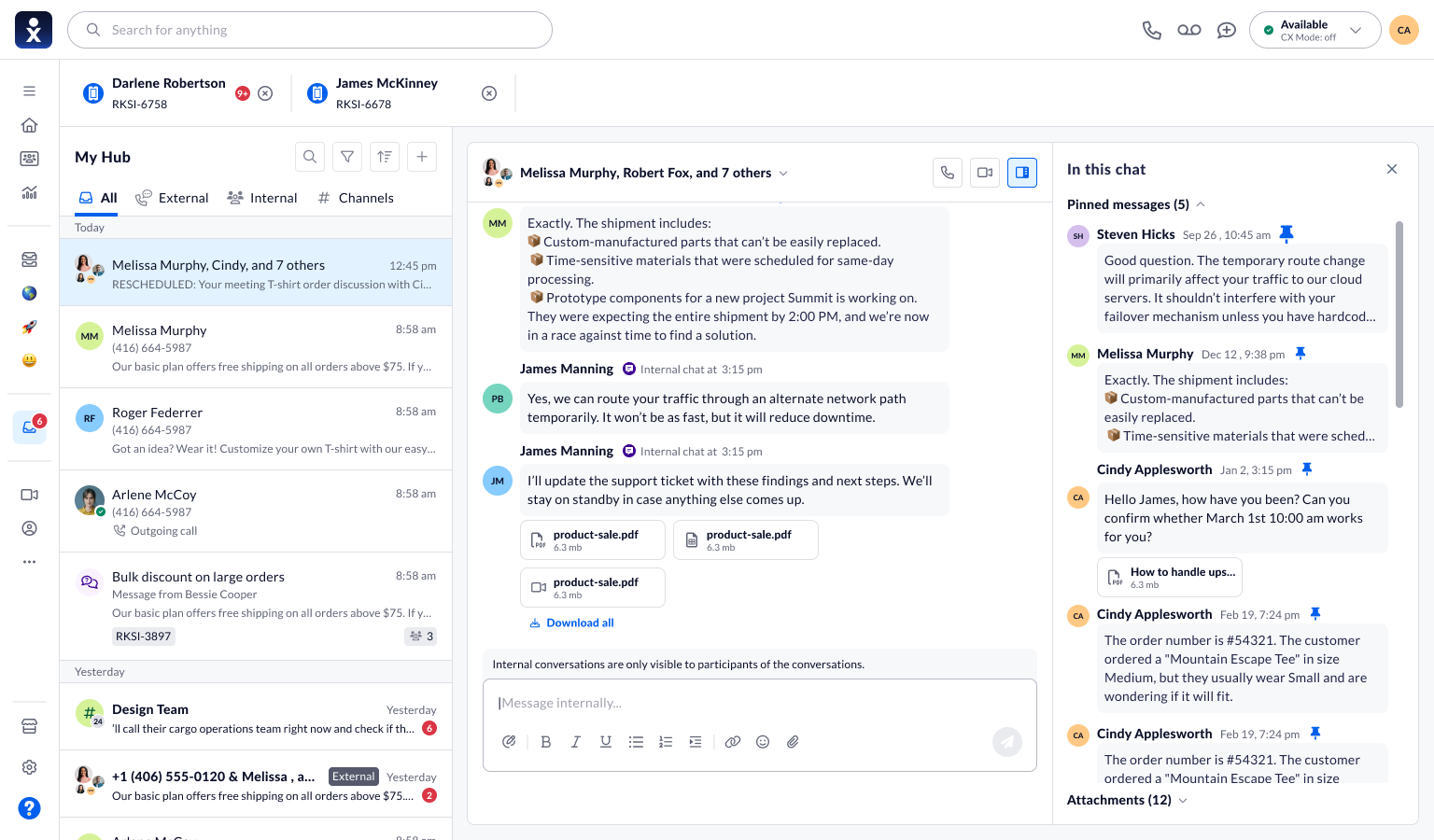
Bring pinned messages into the conversation.
Pinned messages and attachments sit beside the active group conversation.
Make forwarding a deliberate action.
The forwarding dialog separates recipients, an accompanying note, and the original message. A person can review what is being shared and who will receive it before confirming. This keeps the handoff understandable without requiring the whole thread to be copied.
- Design rationale
- Show the recipients, note, and source message together before information leaves its original conversation.
- Tradeoff
- A review step adds effort to forwarding, but gives the sender a chance to check audience and meaning.
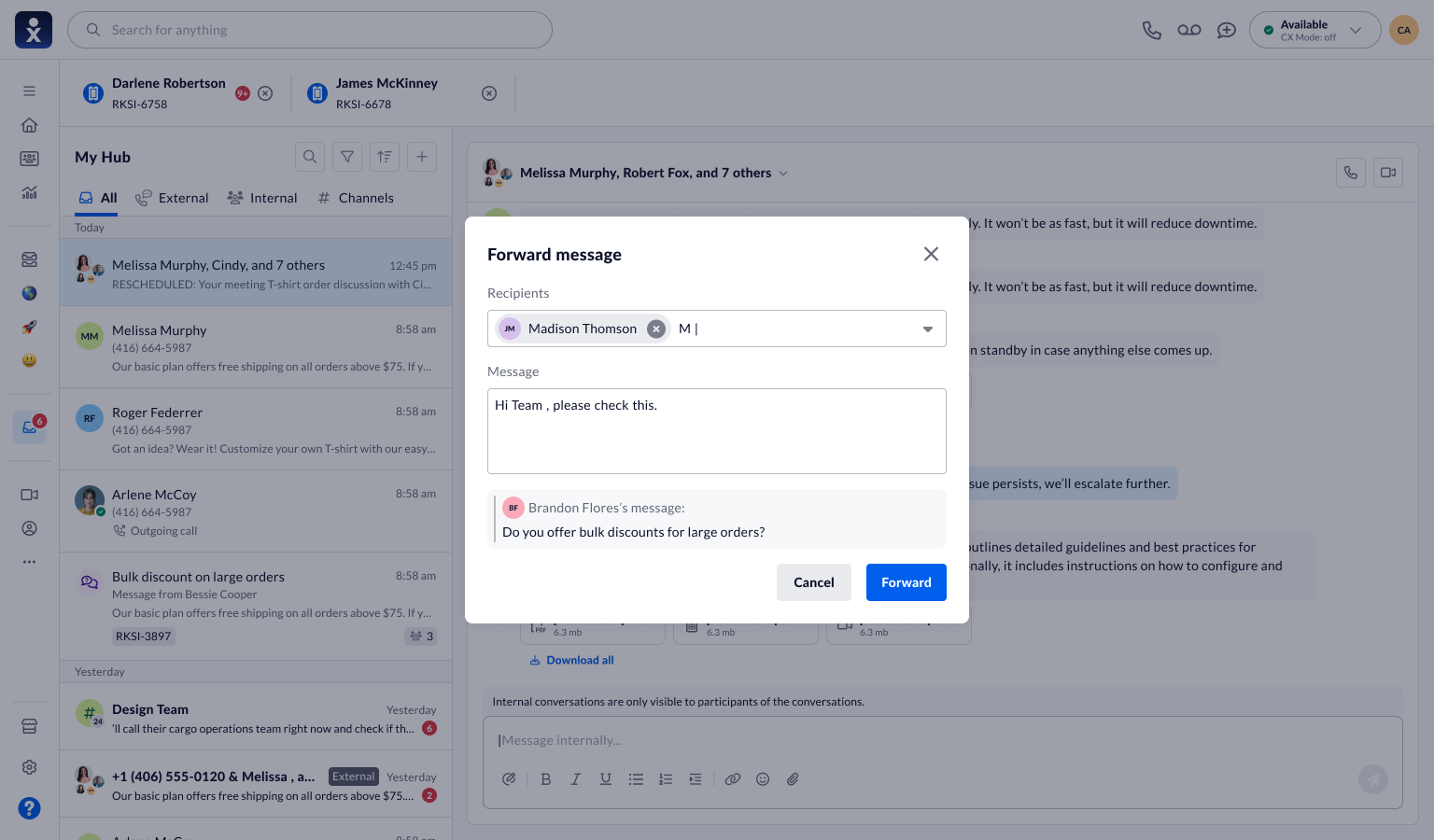
Make forwarding a deliberate action.
Forwarding dialog with recipient selection, an added note, and the source message.
Keep membership changes explicit.
The edit-members dialog represents participants as named chips with removal controls. Save and Cancel provide a clear boundary between changing a selection and applying it. This supports deliberate group maintenance as the discussion evolves.
- Design rationale
- Separate selecting members from saving the change so the group’s audience is a deliberate choice.
- Tradeoff
- Explicit confirmation is slower than immediate changes, but makes cancellation and review straightforward.
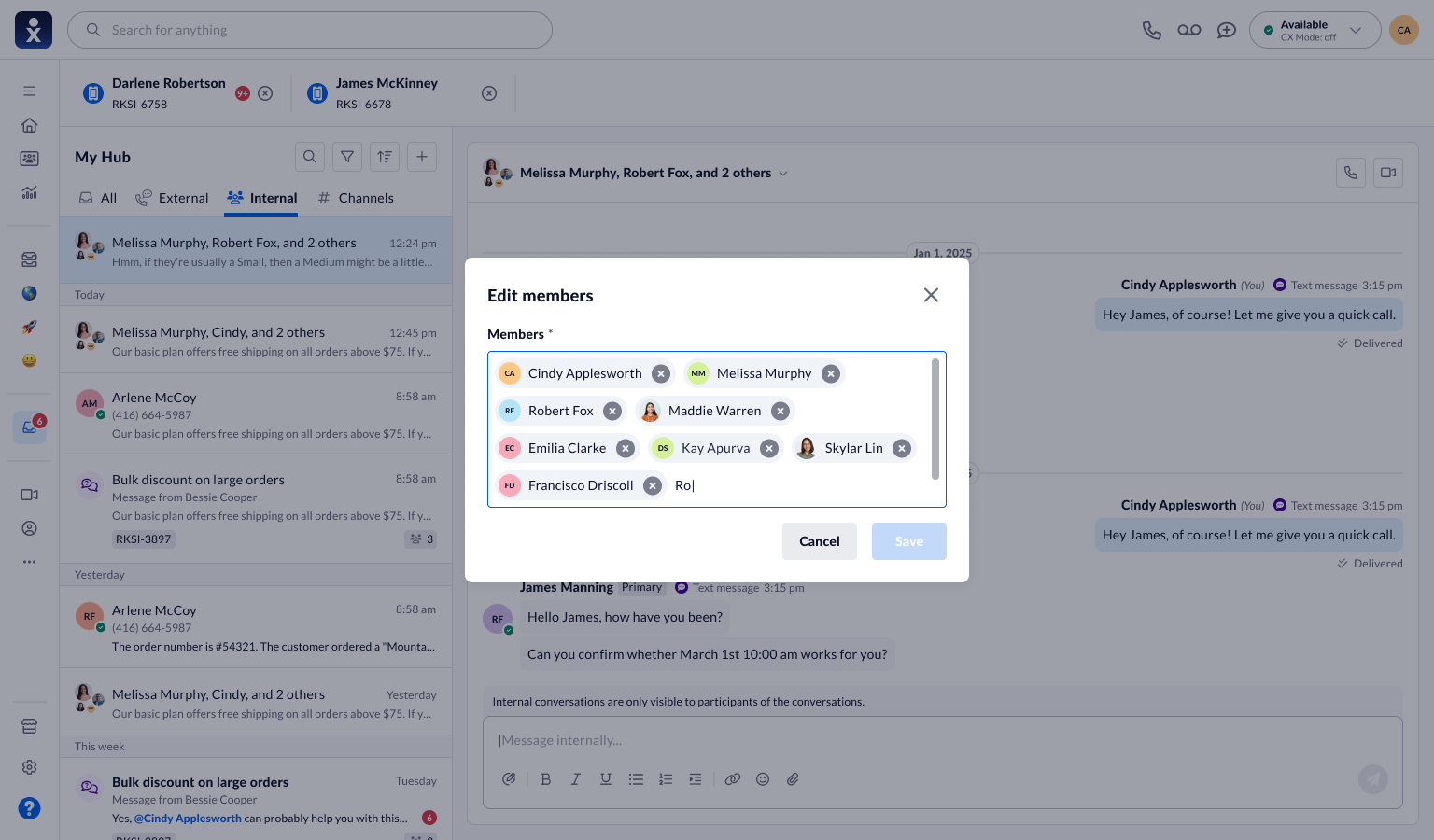
Keep membership changes explicit.
Group membership editor with named participants and Save and Cancel actions.
Let a discussion grow into a shared space.
- 01Find a conversation
- 02Respond or react
- 03Preserve context
- 04Organize the group
Reactions provide an acknowledgment close to the message. Pinning keeps a reference available, while forwarding carries a selected message to another audience. Membership controls and channel creation support more sustained collaboration.
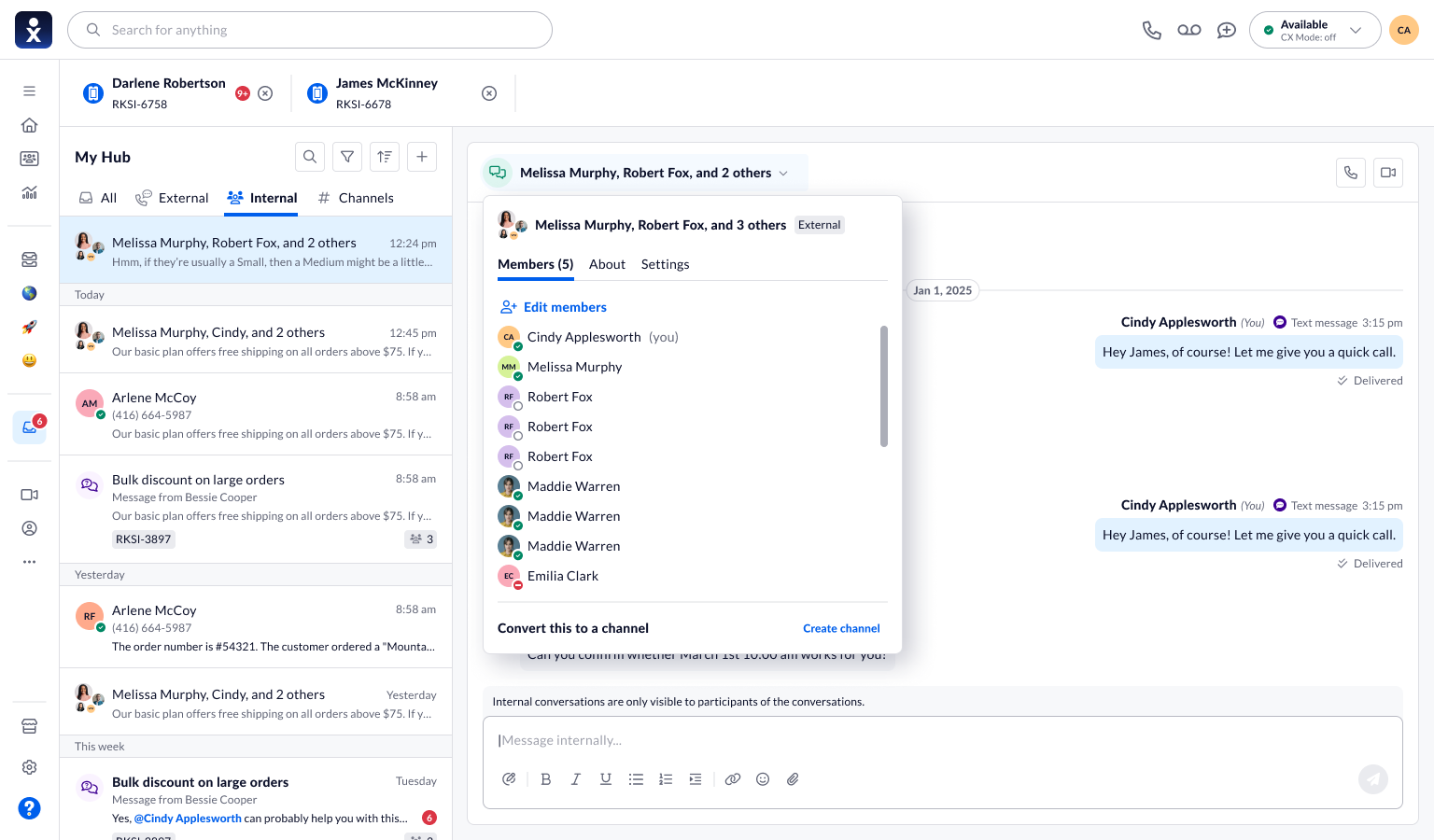
Move from a group discussion to a channel.
The conversation menu exposes members, settings, and a Create channel action.
The screen shows the entry point for channel creation, not the complete naming and confirmation flow. The design rationale is continuity: organize an existing discussion without asking people to start over.
Test understanding as well as completion.
The supplied material demonstrates the interface direction but does not establish usability results for these interactions. Evaluation should check whether people understand the audience and context of their actions.
These are proposed validation questions, not reported test findings. The current guide and supplied designs may represent different product versions.
What the next validation round should establish
Proposed tasks and success signals for a future evaluation; these are not completed test results.
| Scenario to evaluate | Success signal |
|---|---|
| A user switches from an internal thread to an external conversation. | They identify the audience correctly before sending a message. |
| A user forwards a pinned message to another person. | They recover the right message and explain what will be sent and who will receive it. |
| A user edits membership or starts channel creation. | They understand which changes are saved and which require another step. |
A connected set of everyday collaboration tools.
Monthly active users on the platform
My résumé reports this audience for My Hub. It describes the scale of the platform I designed for, rather than growth attributed to these workflows.
The design direction brings message-level actions, reference material, and group controls into the conversation workspace. The intended value is to help people keep context as they respond, share information, and organize their work.
What to evaluate next
Useful measures include successful retrieval of pinned information, forwarding errors, clarity of participant changes, and time spent returning to the right conversation. A baseline and observed results are needed before claiming improvement.
Role and implementation platforms are supplied by Maninder Kaur. The narrative uses the provided product screens and Nextiva documentation; no new adoption or productivity metrics are asserted.
What I take forward
Context includes the audience.
A message is only useful when people understand where it came from and who can see it.
Evaluate linked tasks.
Test retrieving, forwarding, and organizing together, rather than treating each action as an isolated control.