
In this case study
Tracking a swim was only part of the problem.
Swimup was designed for swimmers with different abilities and routines, from beginners building confidence to experienced swimmers pursuing performance goals. The project identified gaps in personalized training, progress monitoring, swim-gear usage tracking, and motivation.
The opportunity was to bring training guidance and activity data into one experience. A swimmer should be able to choose a suitable workout, record a session, and understand their progress without piecing together disconnected tools.
For the swimmer
Ability, access to coaching, and available time vary. A useful plan needs to connect to the person’s own routine.
Across devices
The phone supports planning and reflection; the watch needs a focused set of controls for the active workout.
The design challenge
How might we connect a swimmer’s goals, workout, and progress across mobile and wearable experiences?
Different routines. Shared needs.
The project documents interviews and surveys with novice and experienced swimmers, alongside a competitor review. Recurring themes included personalized workout plans, clearer performance data, opportunities to share achievements, and easier navigation.
| Research theme | Design response |
|---|---|
| Swimmers wanted training suited to their ability and goals. | Ask about the swimmer during onboarding and support personalized workout plans. |
| Progress needed to be easier to follow. | Bring activity summaries, distance, laps, and other metrics into the mobile experience. |
| Some swimmers struggled to maintain a routine. | Include reminders, achievements, and a community feed. |
| Wearable interfaces could feel bulky or distracting. | Focus the watch experience on workout selection, session controls, and a summary. |
| Beginners needed guidance and safety information. | Include education and tutorials in the proposed solution. |
The personas emphasized busy schedules, limited access to coaching, and a need for motivation. These themes helped connect the training experience to everyday constraints.
Three decisions, visible in the product.
The supplied screens show how the design connects personalization, progress, and activity tracking across devices.
Personalize before prescribing.
Onboarding asks for personal details and swimming ability. The swimming-level selection makes the starting point explicit so the app can tailor its information and suggestions.
- Design rationale
- Establish the swimmer’s starting level before offering training guidance.
- Tradeoff
- Profile setup adds effort before the first workout; each requested detail should have an understandable purpose.
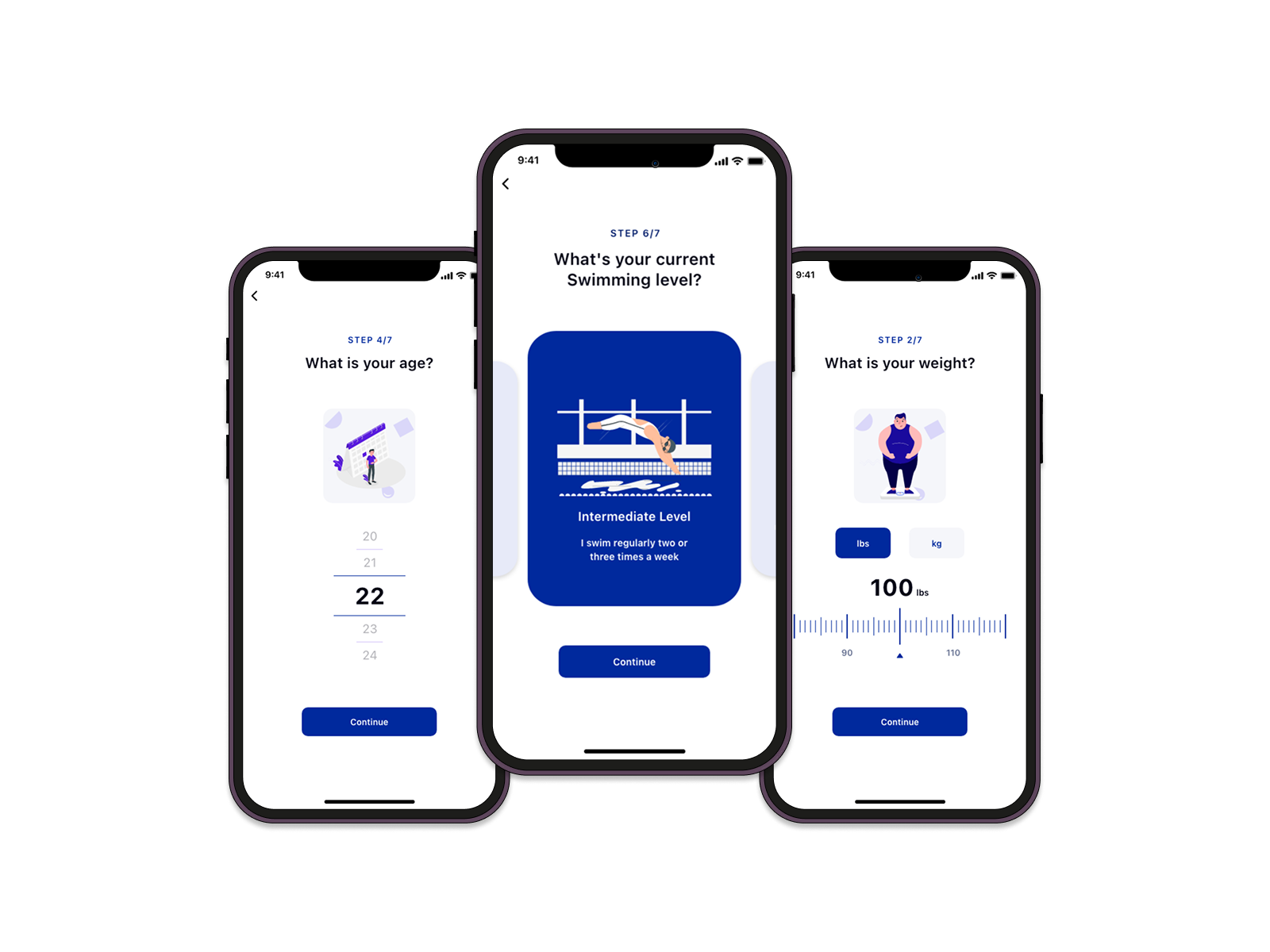
Personalize before prescribing.
Age, swimming level, and weight are collected through a stepped onboarding flow.
Bring performance and encouragement together.
The mobile dashboard offers time-based views of activity, while the feed and profile support sharing and achievements. The design combines personal tracking with the social encouragement identified in research.
- Design rationale
- Keep performance summaries and encouragement in the same mobile experience to connect effort with progress.
- Tradeoff
- Social content can compete with personal activity data. The swimmer’s own progress needs to remain easy to find.
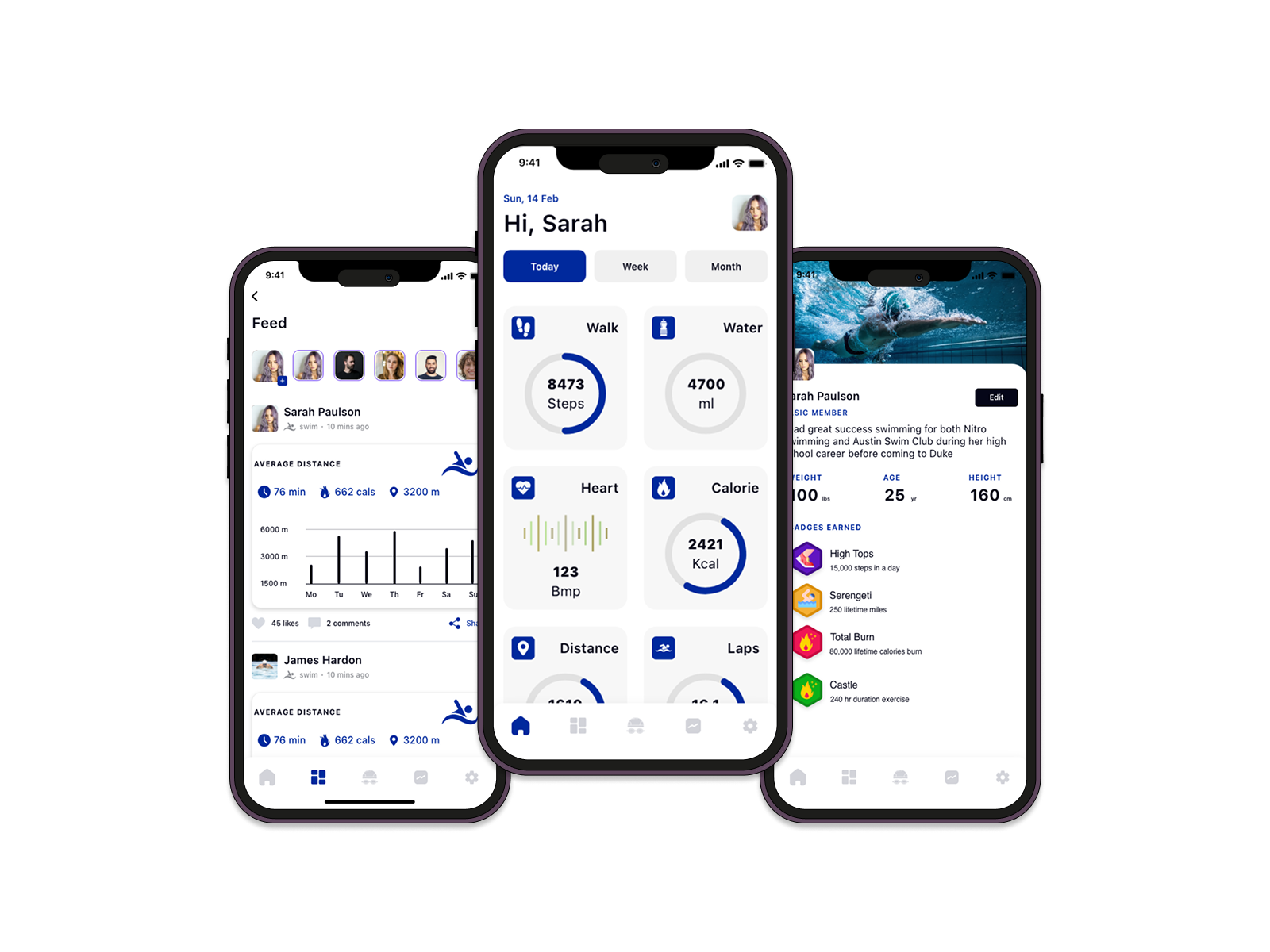
Bring performance and encouragement together.
Daily, weekly, and monthly views sit alongside a feed and achievement badges.
Support device syncing and manual activity logging.
The activity area combines a calendar and session details. Device connection supports synchronization, while manual entry is included for activities that were not tracked. Notifications surface workout reminders and achievements.
- Design rationale
- Support both connected devices and manual records so a missing tracked session does not leave a gap in the activity history.
- Tradeoff
- Different input paths can introduce duplicate or inconsistent records; source and editing behavior need validation.
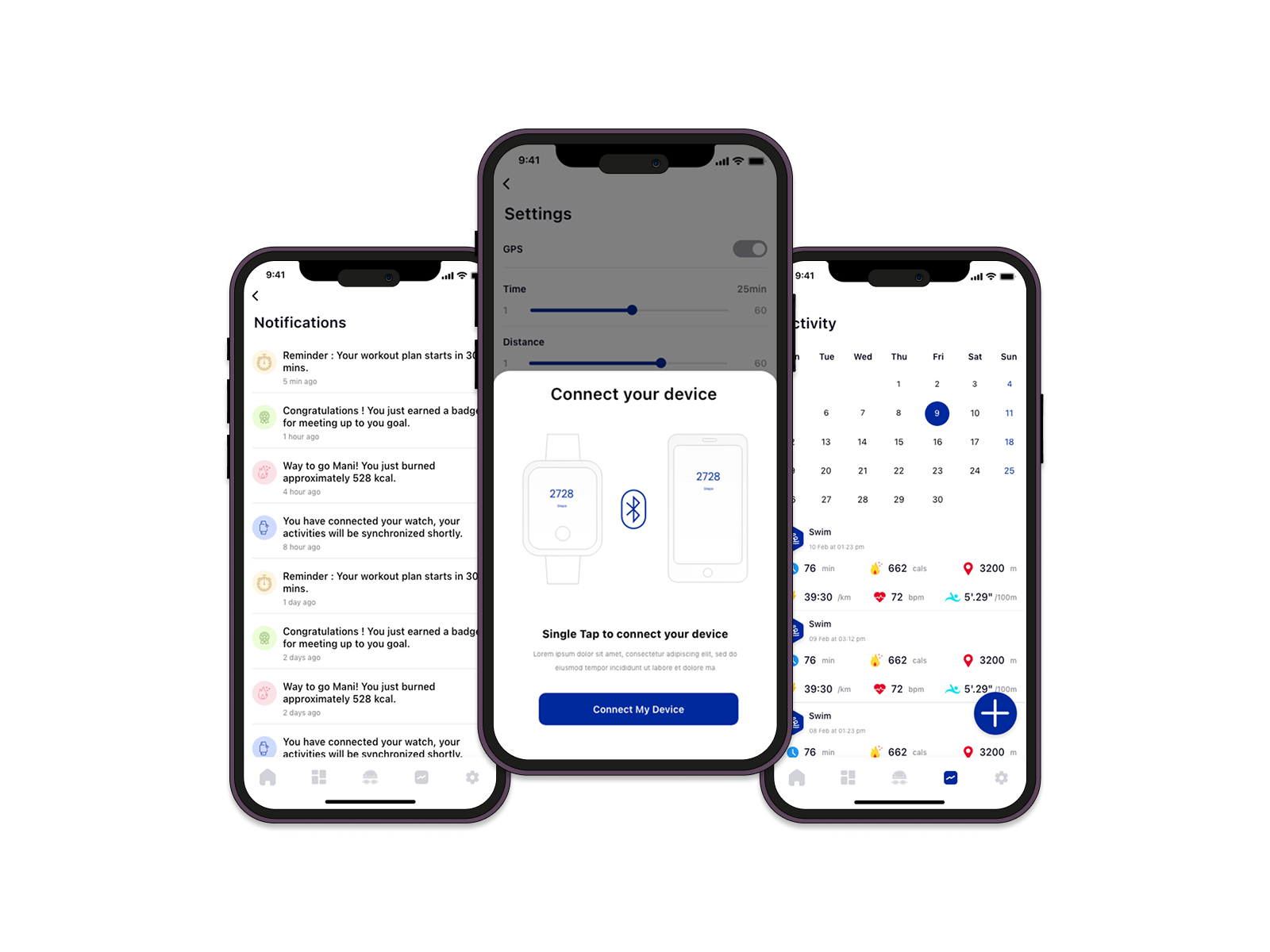
Support device syncing and manual activity logging.
Activity history, notifications, and a device-pairing flow from the mobile design.
Plan on mobile. Follow the session on your wrist.
- 01Set up a profile
- 02Choose a workout
- 03Track the session
- 04Review & share
The information architecture separates the fuller mobile experience from a focused wearable flow. Mobile brings together the dashboard, feed, plans, activity, notifications, and settings. The watch provides a summary and a path through a selected workout.
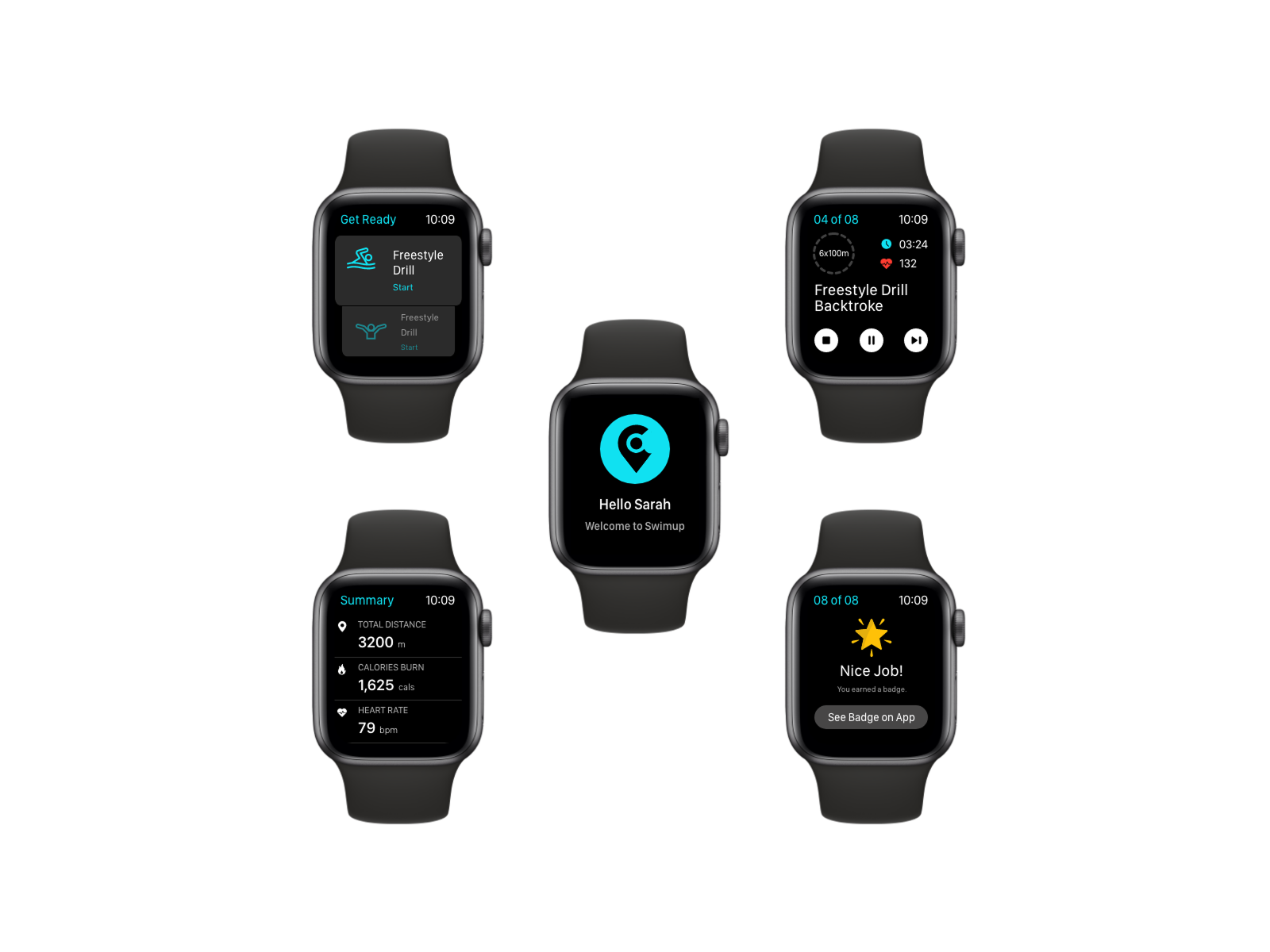
Keep the workout close at hand.
The watch designs show workout selection, session controls, summary metrics, and an achievement state.
Before a swim
Set up the swimmer profile, explore training plans, and connect a wearable device.
During a swim
The wearable flow offers workout selection and controls to pause, end, or move through a session.
After a swim
Review the activity summary, record a missing session, and revisit progress on mobile.
Between sessions
Reminders, shared achievements, and workout guidance support an ongoing routine.
A documented design direction, with more to validate.
The detailed case study presents research, personas, information architecture, visual foundations, and prototype designs. It also includes a testing stage, but does not provide specific test tasks, usability findings, or changes made in response to testing.
The supplied documents support the design process and the screens shown here. They do not establish a measured improvement in swimming performance, engagement, or retention.
These are proposed validation questions, not reported study findings.
What the next validation round should establish
Proposed tasks and success signals for a future evaluation; these are not completed test results.
| Scenario to evaluate | Success signal |
|---|---|
| A beginner sets up a profile and selects a workout. | They can choose an appropriate level and understand the workout’s next step. |
| A swimmer pauses or ends a wearable session. | They can distinguish the controls and understand the resulting session state. |
| A swimmer adds an activity that did not sync. | They can record it and distinguish it from a synced session in their history. |
One connected training experience.
The project produced mobile and wearable designs that bring onboarding, activity tracking, workout guidance, and community features into a shared experience. The intended benefit is to help swimmers personalize their training and follow their progress over time.
Design takeaway
The central idea is continuity: the phone supports preparation and reflection, while the wearable keeps the active workout within reach. Progress becomes more useful when it connects back to a swimmer’s goals and next session.
Case study adapted from the two supplied Swimup PDFs. Screens are reproduced from the project material; no launch metrics or business outcomes have been added.
What I take forward
Give each device a clear job.
The mobile experience supports preparation and review, while the wearable keeps the active session focused.
Validate continuity across devices.
The next round should include incomplete syncs, manual records, and interrupted workouts as well as the planned flow.