
In this case study
A contact list needs to do more than store names.
A team needs to find a person quickly, recognize the right record, and keep information usable as new contacts arrive. A dense directory, inconsistent source fields, and duplicate records create different kinds of friction.
The design problem is balancing speed with care: make routine lookup simple while giving users enough control when creating, sharing, or importing information.
This narrative connects the product designs and documented workflows with a desktop prototype benchmarking study. The study findings and recommendations are shown below; proposed improvements are distinguished from implemented changes.
For an agent
A directory needs to reveal the right person and useful context quickly, without opening every record.
For someone importing data
Field mapping, visibility, and duplicates have consequences that should be clear before the import is committed.
The design challenge
How might we make everyday contact lookup simple while keeping consequential data changes explicit?
Research connected the workflow to its friction points.
Eight sales and support participants evaluated eight desktop flows in moderated, 45-minute sessions using a Figma prototype. The study combined flow benchmarking with an overall System Usability Scale (SUS) assessment.
April 2025 study by Stephen Sprague; my role was product design and research stakeholder. Results describe the prototype, with live-product retesting recommended.
Start with the tasks the product supports.
The NEXT Contacts guide ↗ documents contact creation, search, editing, deletion, merging, and switching between list and table views. It also describes public and private records, with visibility chosen before saving. These documented constraints make identity, visibility, and record maintenance important design considerations.
| Visible in the supplied screens | Design priority |
|---|---|
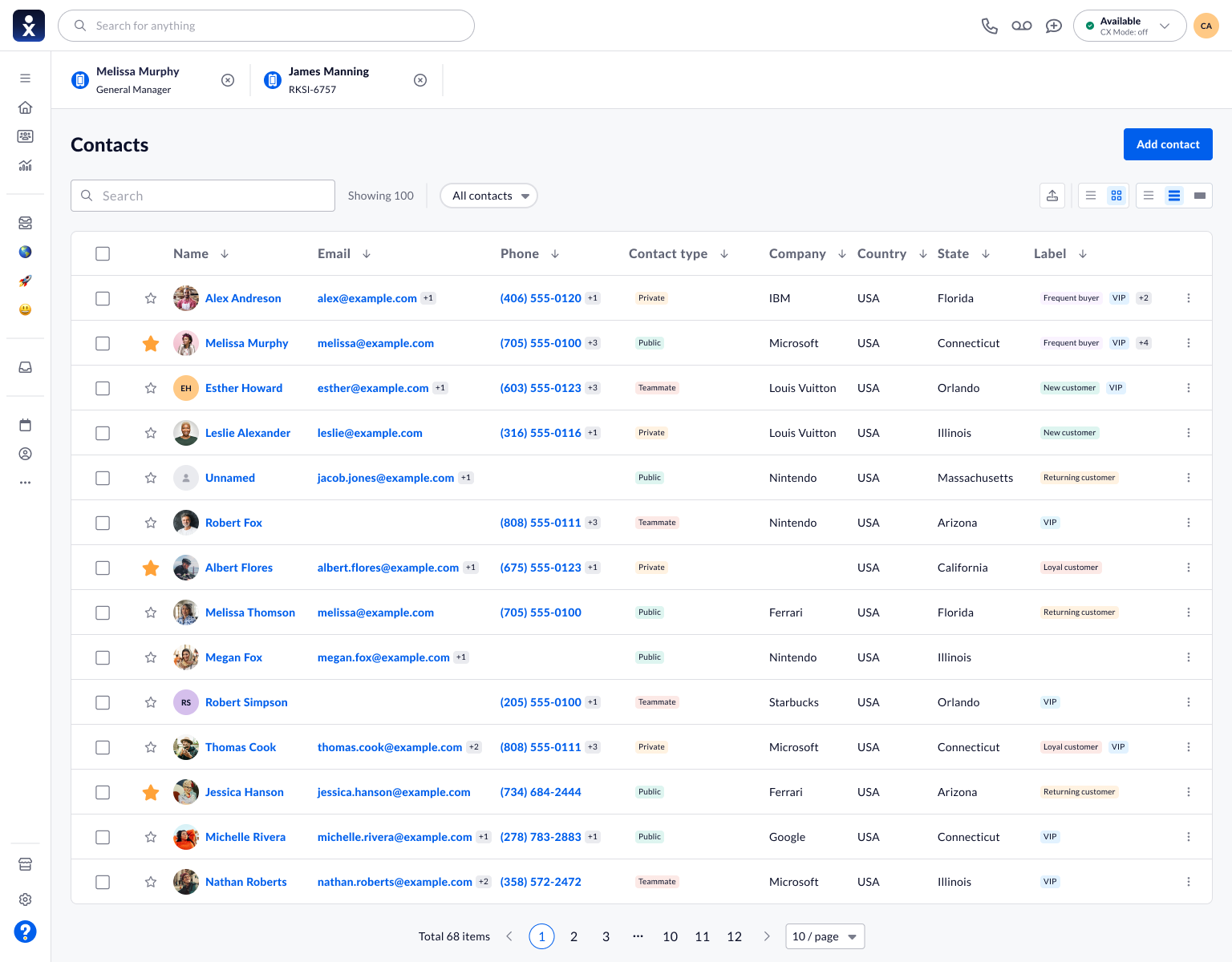
| A table combines names, contact details, company, location, and labels. | Help users scan records without opening each one. |
| The add-contact dialog groups information into tabs. | Keep basic entry focused while accommodating a richer record. |
| Import separates source, mapping, duplicates, and completion. | Make a complex data operation understandable one decision at a time. |
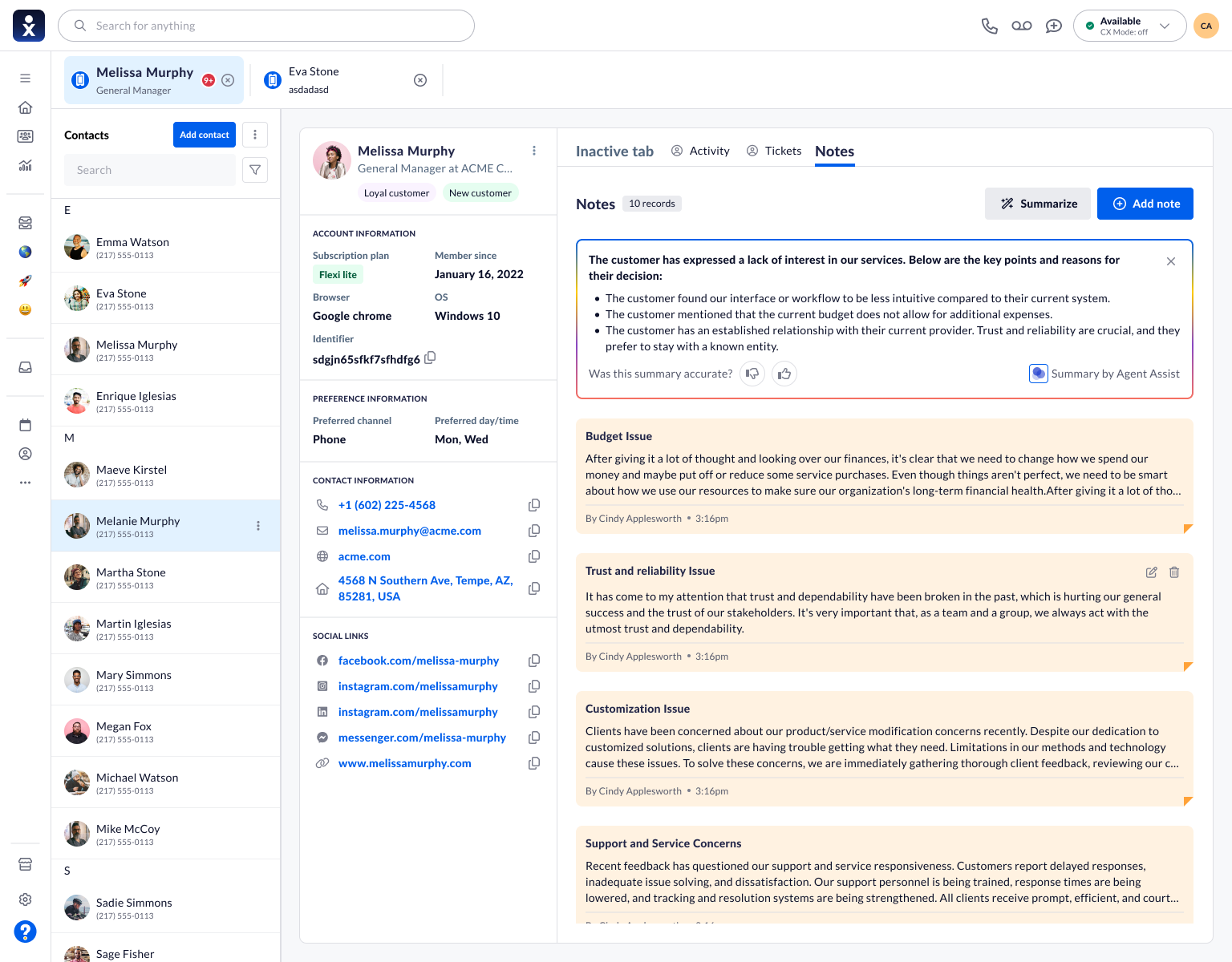
| The notes view places a summary above individual notes. | Offer a quick orientation while keeping underlying context available. |
Three decisions, visible in the product.
Keep the essential details together.
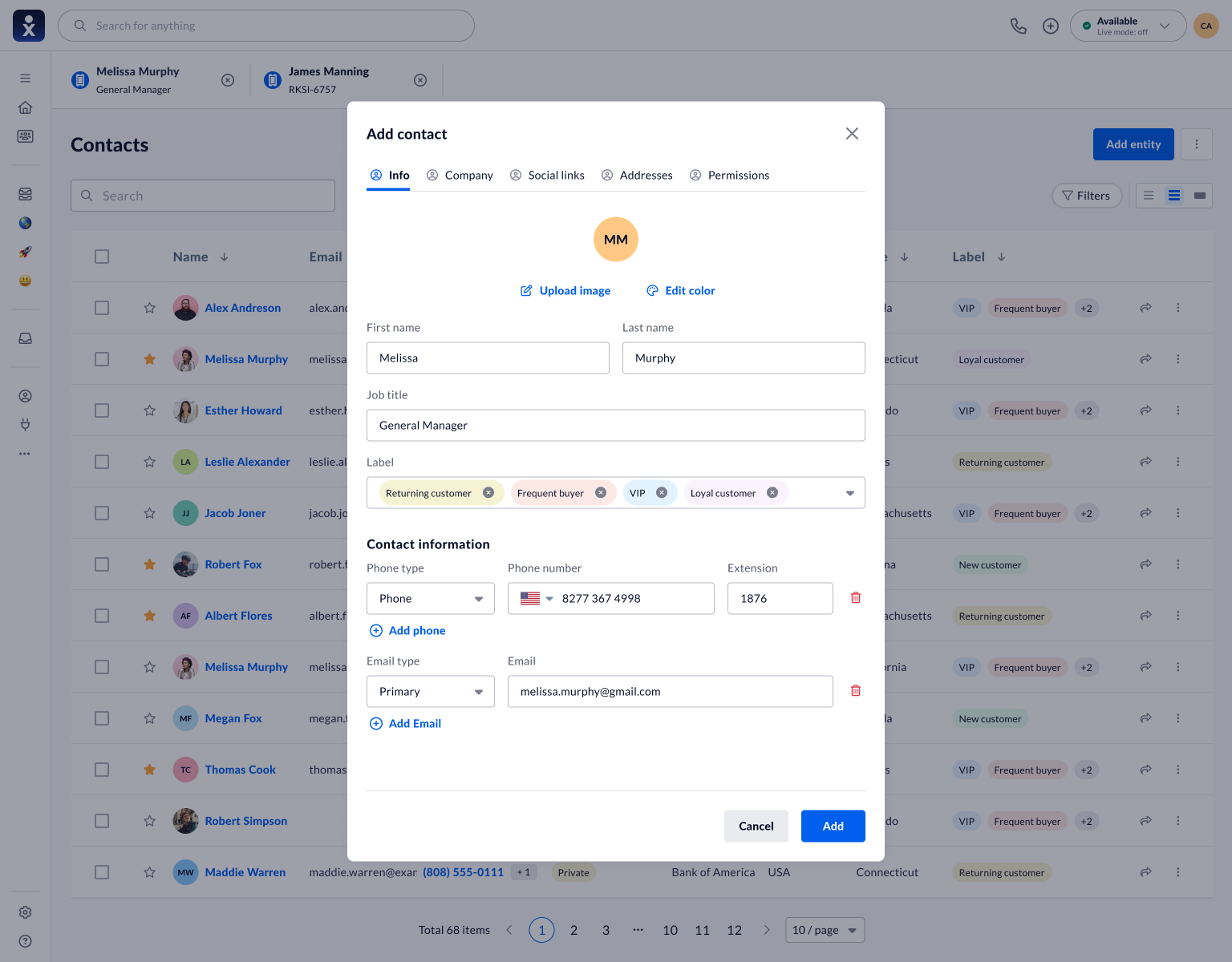
The add-contact dialog puts identity, labels, phone numbers, and email addresses in the first tab. Company, social links, addresses, and permissions remain separate destinations. This grouping limits the information presented at once without flattening the record into a minimal form.
- Design rationale
- Group essential identity and contact fields together while keeping richer record details in separate tabs.
- Tradeoff
- Tabs limit the initial form but can hide secondary fields. Their labels and entry points need to be discoverable.
Keep the essential details together.
Contact creation with grouped tabs and controls for adding phone and email entries.
Show where imported information will go.
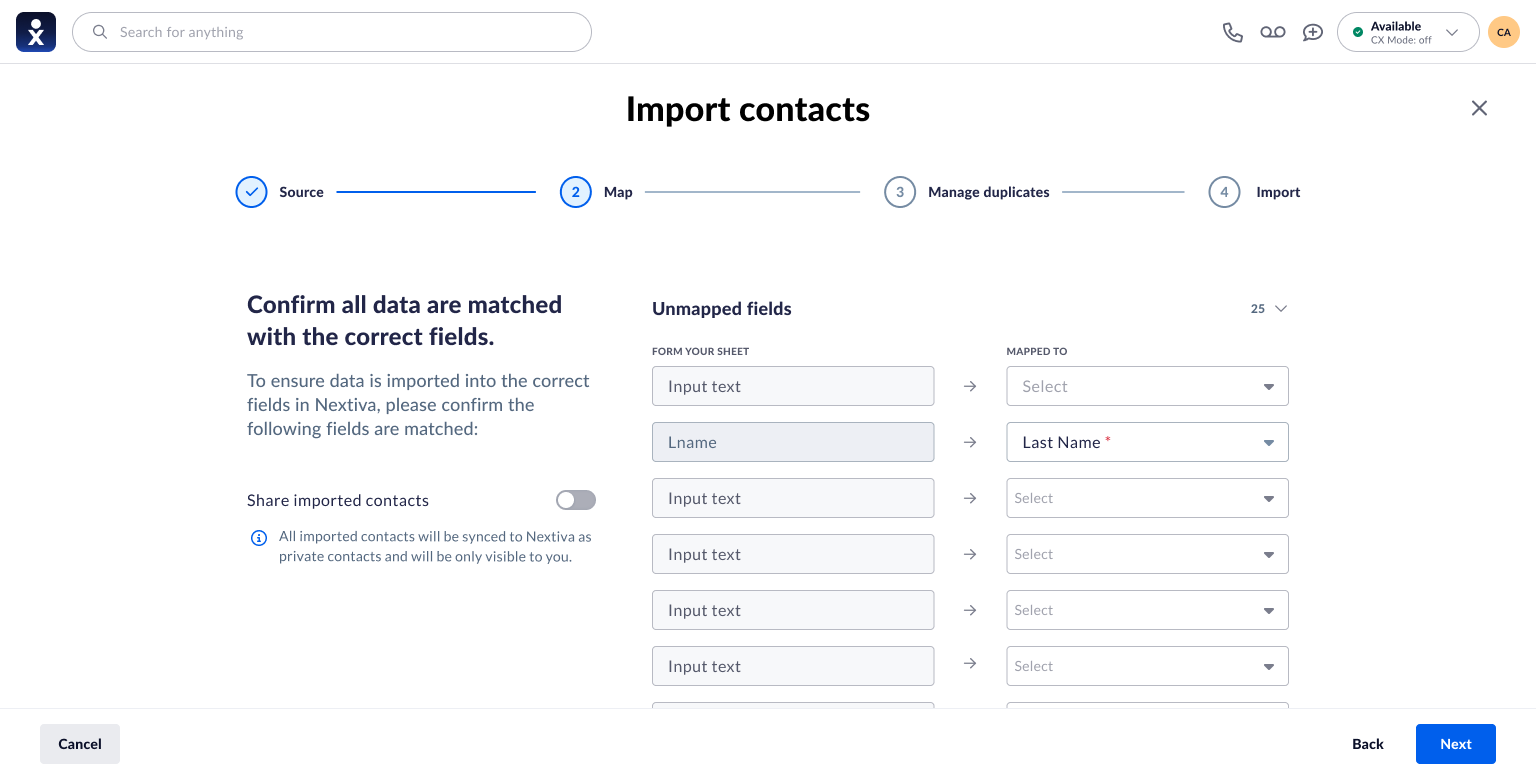
Source column names do not always match the destination model. The mapping screen pairs each source field with a destination selector and makes unmapped fields visible. Sharing is presented alongside the mapping task, with explanatory text about visibility.
- Design rationale
- Pair source columns with destination fields to make the import model visible before records are created.
- Tradeoff
- Manual mapping adds setup effort, but helps users identify mismatched or unmapped information.
Show where imported information will go.
Source-to-destination field mapping and an explicit sharing choice.
Ask how existing records should be treated.
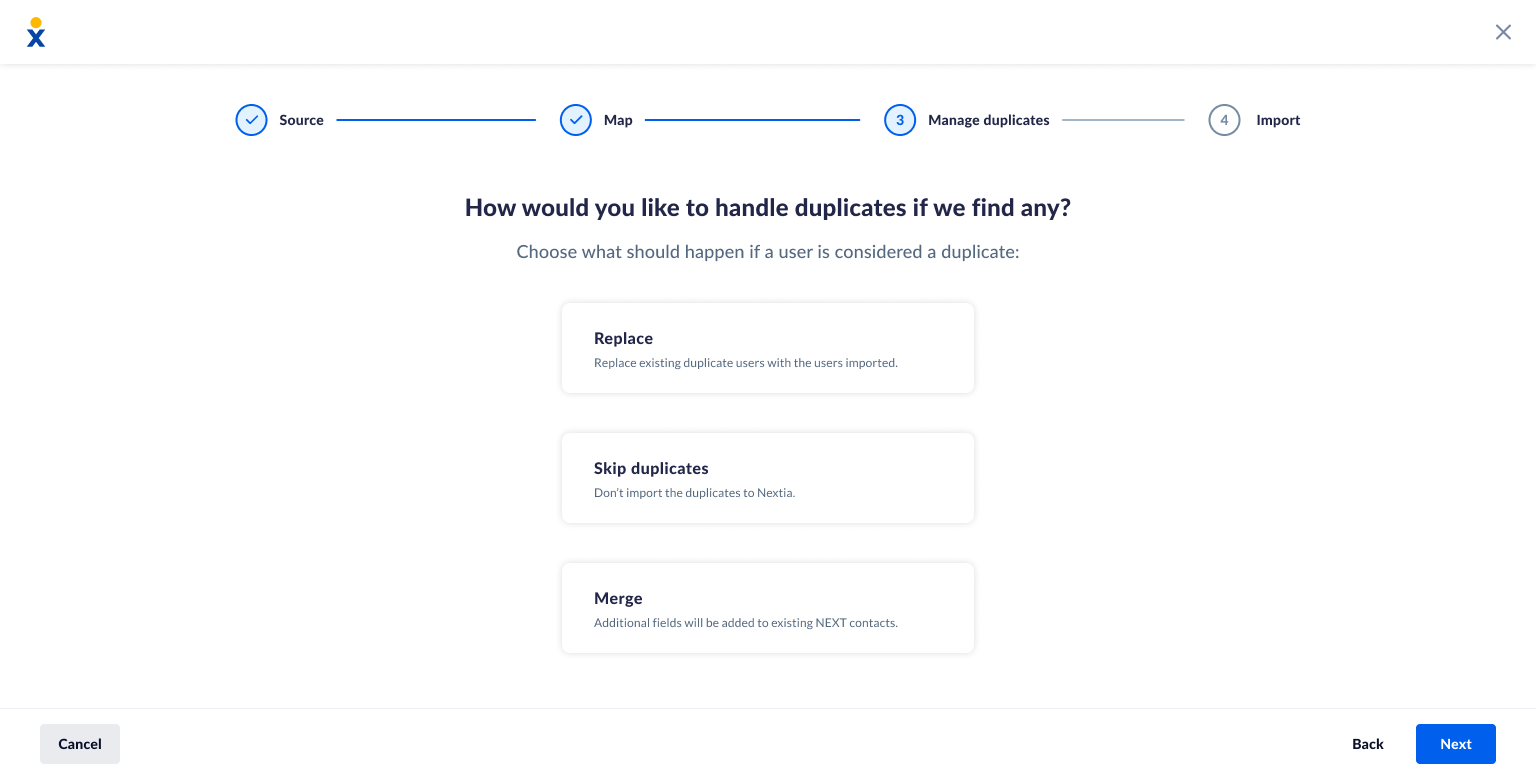
The import design presents Replace, Skip duplicates, and Merge as separate choices with short explanations. The important design principle is to expose the consequence before import rather than silently deciding what to do with existing information.
The NextivaONE contact guide distinguishes three import behaviors: Merge fills missing fields, Skip ignores duplicate input, and Replace overwrites existing information with the imported data. This is useful context for explaining why the choices need clear descriptions.
These are documented NextivaONE rules, not a claim that every NEXT implementation behaves identically.
- Design rationale
- Explain duplicate-handling choices before users commit the import.
- Tradeoff
- Offering several strategies requires careful wording so users can predict which information will be retained or replaced.
Ask how existing records should be treated.
Duplicate-handling options within the four-stage import flow.
Connect incoming data to everyday work.
- 01Choose a source
- 02Map the fields
- 03Handle duplicates
- 04Use the record
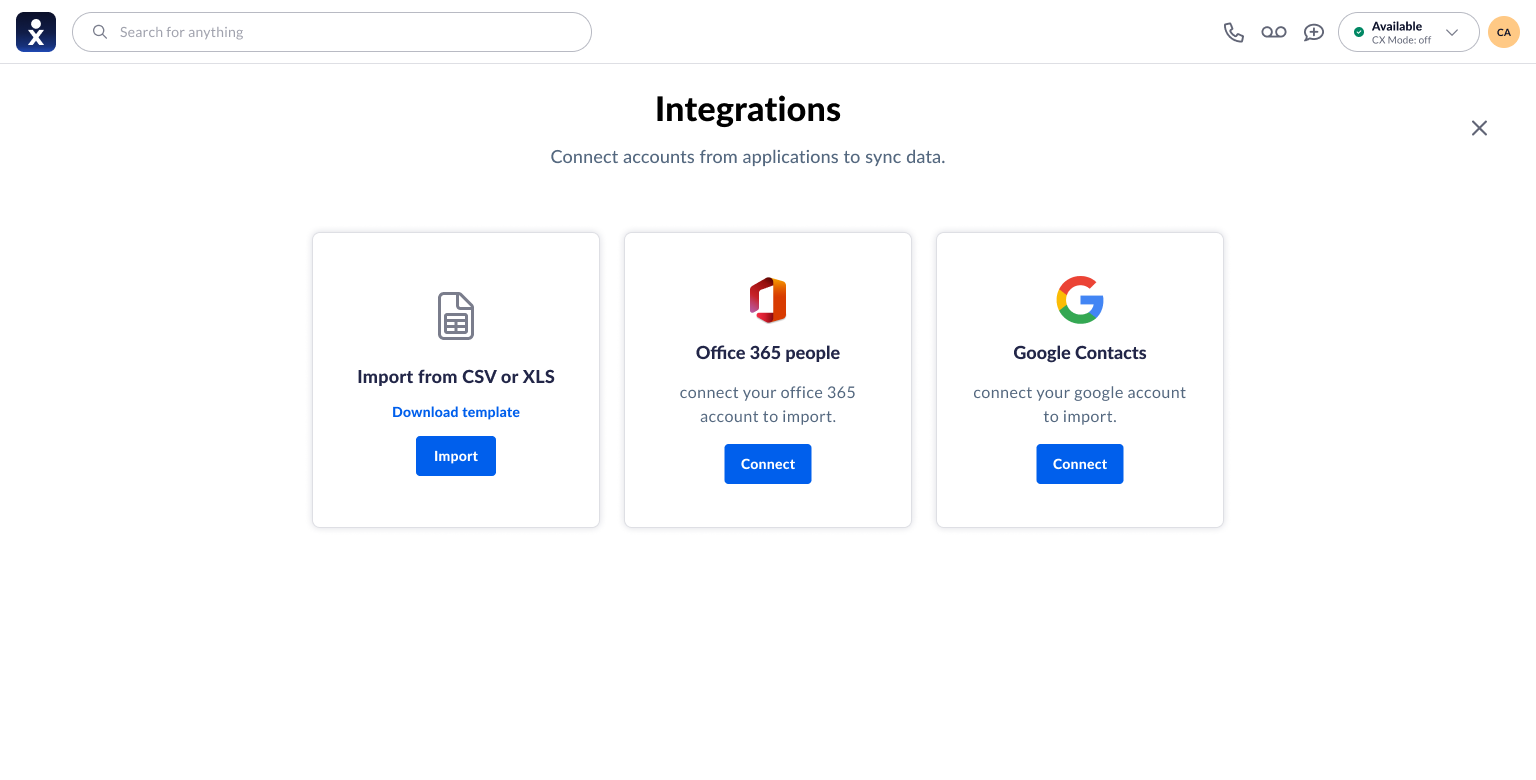
The supplied integration screen brings file import and account connections into one starting point. The staged import flow then moves from source selection to data decisions.
Make the starting point recognizable.
Integration choices for CSV or XLS files, Office 365 people, and Google Contacts.
Once a contact is selected, the detail workspace keeps identity and account information beside the active content area. In the notes design, an Agent Assist summary sits above the original notes and includes feedback controls. This supports a quick overview without removing the source material.
Keep the summary beside its context.
Contact details, individual notes, and an Agent Assist summary with accuracy feedback controls.
Scale the workflow without hiding its consequences.
The NextivaONE bulk-management guide describes searching and filtering before batch actions, followed by selection and an explicit edit, export, or delete action. Export and deletion of shared business contacts have administrator restrictions.
For this design, the relevant lesson is to keep the selection scope, available actions, and confirmation clear. A batch operation magnifies an error, so users need to understand which records will change before committing.
NextivaONE is referenced as related product context. Its batch limits and permission rules are not attributed to the NEXT screens shown here.
Key findings
The prototype received a strong overall usability rating. Profile access, view switching, and merging still offered opportunities to improve the experience.
Selected benchmark highlights
Five of the eight evaluated flows
- Edit avatar color100%
- Add contact note100%
- Upload profile picture94%
- Delete contact note88%
- Bulk delete88%
Overall SUS score
A — Excellent
Rating reported in the research study
SUS is a usability score, not a completion percentage.
What the findings pointed to
Make entry points easier to find.
Offer more direct access to profile editing, keep the table/list toggle in a consistent position, and make note actions easier to recognize.
Clarify merging, then retest.
Make the merge process and its consequences understandable. Evaluate discovery and completion together in the implemented product.
Selected findings from the April 2025 desktop prototype study (n=8). Recommendations are not presented as shipped changes or measured improvements.
A clearer model for managing customer information.
The design connects a scannable directory, structured contact capture, guided import, and a contextual record view. Its intended value is to make information easier to find and maintain while keeping consequential data choices visible.
What to measure next
Use the prototype study as a reference when evaluating the implemented flows. Import mapping, abandoned imports, and summary accuracy would need their own task baselines because this report does not establish those results.
The study establishes a prototype SUS score and flow-level benchmarks. It does not establish measured business impact, the effect of later changes, or a live-product comparison.
Source: user-supplied product designs and Nextiva’s NEXT Contacts documentation. Screen analysis and proposed evaluation criteria are editorial synthesis; the research and validation sections summarize selected findings from the supplied desktop benchmarking report.
What I take forward
Discoverability is part of completion.
An action can work well once found while still being difficult to reach. The evaluation themes make that distinction important.
Make the next evaluation end to end.
Include finding the action, completing it, and explaining its consequences before making improvement claims.